
Sisyphus's Worst Day (again)
Lead Game Designer (Core Gameplay)
Project Overview
On this puzzle game, I am the Lead Game Designer, where I am:
-
Designing 3 Cs, including AI behavior, object placement and camera controls, level interaction buttons, and camera movement
-
Iterating on win and loss feedback UX; designing and implementing tutorials; leading 2 other level designers
Sisyphus's Worst Day (again) is a puzzle game where you play as Daedalus, a once-retired architect trying to trap Sisyphus in infinite loops. Use various tools at your disposal to complete your job!
Features:
-
Place traps along Sisyphus's path to force him back down the mountain
-
Finish puzzles, talk to Zeus (your boss), and improve your job performance
This project has 35+ team members and 3 total designers (including me). The game will release on Steam in 2026.

Gameplay footage
My Contributions: Gameplay Systems

Sisyphus looping in Level 4

Sisyphus pathfinding tiebreak diagram
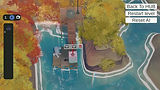
Move, rotate, delete gizmos
While leading 2 level designers, I created a process to ensure cohesive design within the vision and constraints of the game. With this process, I am designing the 3 Cs, feedback systems, and the core game tutorials. To make the design vision come to life, I am also collaborating with engineers, writers, and artists.
Process I established for my design team:
-
Define a clear, singular purpose for a mechanic or level
-
Draft a design doc for the simplest version of the mechanic; block out the simplest version of the level so it can be tested
-
Playtest the feature or level and evaluate if it is effective for its purpose
-
Iterate and repeat steps based on results
My design constraints for gameplay and content:
-
Sisyphus AI must always be able to push the Boulder -- therefore, an infinite loop is the only solution to a puzzle
-
Top, Video: Sisyphus looping demo
-
-
Players should feel clever when finding solutions
-
Mechanics must be clear in how they affect Sisyphus
-
The game should feel like the player is working in an office environment
MY DESIGNED FEATURES BREAKDOWN
Character, Controls, Camera
-
Character: Sisyphus AI will push the Boulder until he is unable to, or until he reaches the summit (marked by the flag)
-
He will reorient himself to push the Boulder around corners, but he can never pull the boulder away
-
He will always take the shortest path to his goal, resulting in loops
-
Middle, Image: pathfinding tiebreak diagram
-
-
-
Controls: Takes inspiration from 3D modeling software
-
Trap Placement: Gizmos appear to move, rotate, and delete traps
-
Bottom, Video: gizmos for modifying traps
-
-
Controlling Sisyphus: Video-playback style buttons to test solutions
-
Keybinds: Every action can be done from the keyboard for efficiency
-
-
Camera: Emulate orthographic projection with a zoomed in, far camera to make Sisyphus small
-
Can rotate the camera to see level sections better
-
Feedback Systems
-
Win State: Sisyphus AI continues looping for eternity; win banner pops up
-
Loss State: Notification banner pops up to explain why the player failed
-
Additional feedback: Sisyphus barks and warning highlights on the grid
-
-
Trap-Specific: Highlighting trap area-of-effect to show functionality
Tutorialization
-
Level 1 teaches the player how to USE the tools
-
Level 2 teaches the player how to SOLVE puzzles
-
Gradually feeds information to not be overwhelming
-
Allows players to fail so they can learn puzzle solving strategies
Design Case Study: Enemy Perception
The most significant challenge I faced on The Veiled Ones was on enemy perception. I iterated on this player detection system throughout the whole year. Here's a breakdown of the problems and the actions I took to solve them:
PROBLEM 1: VISION CONES
-
My Task: Promote stealth gameplay while preserving enemy invisibility
-
Initial Idea: Because enemies are invisible, vision cones should be circles
-
Top, Image: pre-alpha vision cone diagram
-
-
Situation: Players did not understand why their actions put them in danger
Actions I took:
-
Implemented 2 vision cones for enemies: a 360 degree vision cone for close ranges (< 3m), and 15 to 40 degree vision cones for all other ranges
-
Increased sound detection when the player sprinted to encourage stealth
PROBLEM 2: LOOKING GLASS DEBUFF
-
My Task: Discourage Looking Glass usage near enemies
-
Initial Idea: Enemies' "detection level" should directly increase when a player looks at them through the Looking Glass
-
Situation: Players did not understand why enemies were so angry, especially when they were NOT seen or heard by them
Actions I took:
-
Buffed sight and sound detection ranges for enemies when using the Looking Glass, and removed the direct "detection level" increase
-
This is what players thought was already happening!
-
Bottom, Video: getting detected when looking at enemy through Glass
-
RESULTS FROM THESE ACTIONS
-
Players felt anxious, clever, and satisfied while sneaking past enemies
-
Players used the Looking Glass more sparingly
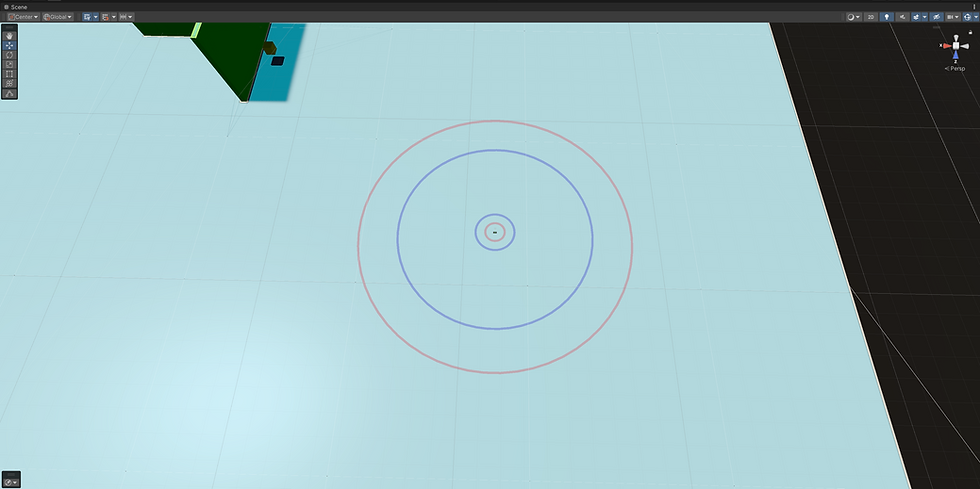
Pre-alpha vision cone (purple) and sound cone (red)

Getting detected while using Looking Glass

1) Initial Looking Glass behavior mockup in Miro

2) Perception checks initial implementation in engine
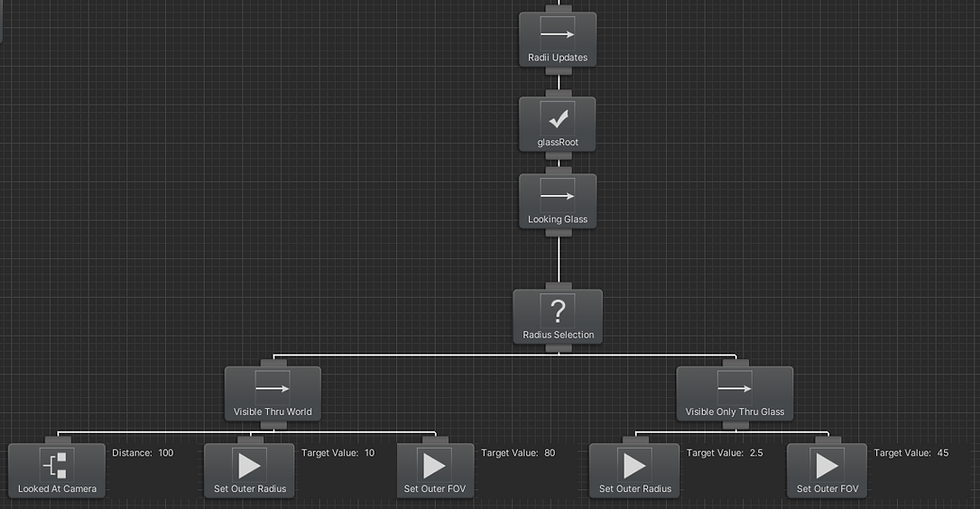
3) Final Looking Glass subtree implemented in engine
Project Takeaways

Hiding spot check behavior I implemented
By wrestling with design challenges like the one described above during my time on The Veiled Ones, I made a few key learnings that further inform my process:
LEARNING 1: Player expectations are worth considering and designing around for non-intuitive mechanics instead of forcing a feature to work.
LEARNING 2: Sometimes, the most obvious solutions to a problem are the correct ones -- always start small and simple, then add complexity if needed.
-
Left, Video: A "hiding spot check" behavior I implemented for balance
LEARNING 3: In some cases, balancing a feature's difficulty means adjusting EVERY variable, not just the most relevant ones.
As a result of this project's work, I got a better grasp on game balance and feature iteration than before.
Additionally, by the end of the project, I gained several skills that proved useful for future projects:
SKILL 1: How to read, design, and program Behavior Trees (all engines)
-
Right, Image: The implementation of the hiding spot check in Unity
SKILL 2: How to design features with proper intentions, and how to iterate on them while preserving those intentions to ensure cohesive design
SKILL 3: How to write design documentation for other designers, engineers, and multidisciplinary collaborators for implementation
Through gaining these new skills, I improved my technical ability (especially with game AI scripting) and enhanced my communication strategies.

Hiding spot check subtree